

“I Thought SAP Made That Impossible”: SAP Duplicate Invoice Myths

When we run AP.guru against a company’s SAP data and show them the duplicate payments we found, the reaction is almost always the same: “How did that happen? I thought SAP made that impossible.”
Recently I came across an excellent two-part write-up on the SAP Community by Ajit Kumar (Part 1 · Part 2) that lays out exactly how SAP’s duplicate invoice check works: the fields it compares, the settings that control it, and where it quietly does nothing. It’s one of the clearest explanations I’ve seen. So I want to do two things here: give Ajit’s articles full credit (they’re well worth reading in full), and then layer on the commentary we’ve built from 25 years of watching where this control actually breaks in the real world.
Source and credit: Ajit Kumar, “Duplicate Invoice Check” on the SAP Community: Part 1 and Part 2. The SAP screenshots below are from those articles.
What SAP actually checks
As Ajit’s article documents, in Logistics Invoice Verification (the MM side) SAP’s standard duplicate check compares a new invoice against what’s already posted using six fields: company code, vendor, currency, gross invoice amount, reference (invoice) number, and invoice date. If they all match an existing document, SAP flags it.
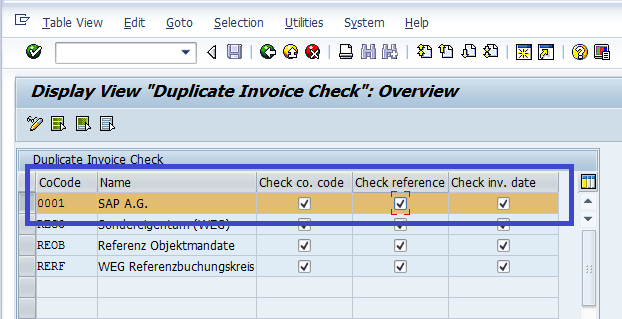
Here’s the catch: three of those six can be switched off in configuration (transaction OMRDC): company code, reference number, and invoice date. And on the FI side (FB60), the logic differs again: when the reference number is filled, the check uses company code, vendor, currency, invoice date, and reference, but not the amount. So the real question isn’t “does SAP check for duplicates?” It’s which fields is your SAP comparing, for which vendors, and does it warn or actually stop? That’s where the myths live, and where our commentary begins.
Myth 1: “It checks across our whole company”
For years, SAP has treated company code as one of the matching fields, so the check effectively runs within a single company code: an invoice in one company code isn’t compared against invoices in another. The original rationale was performance; checking across every company code was considered too heavy. That reasoning is decades old. Servers today are vastly more powerful. For a business running multiple company codes (shared-service or multi-entity setups especially), this is real exposure: the same invoice can be paid in two company codes and each check sees nothing wrong. You can broaden the check by deactivating the company-code field in OMRDC, but most companies never have.
Myth 2: “It’s just reference number, date, and amount”
Most people assume the control keys on reference number, invoice date, and amount. What surprises them is that currency is always part of the comparison: you can’t turn it off. For a single-currency shop that’s fine. For a multi-currency operating company, the same invoice processed under two currency codes may not be seen as a match. It’s a narrow gap, but for global organizations it adds up.
Myth 3: “The same invoice number can only be entered once”
Because invoice date is part of the key, the same reference number with a different invoice date posts perfectly clean. It happens constantly: a vendor reuses invoice numbers in a new fiscal year, a date gets keyed wrong, or someone nudges the date by a day to clear an exception. Same invoice number, different date, and SAP sees two unique documents. (The comments on Ajit’s article are full of people running into exactly this.)
Myth 4: “Every vendor is covered”
Here’s the one almost nobody expects. SAP’s duplicate check is switched on vendor by vendor, through the “Check Flag for Double Invoices and Credit Memos” indicator on each vendor’s company-code data (field LFB1-REPRF). If that flag isn’t set for a vendor, no duplicate checking happens for that vendor at all.
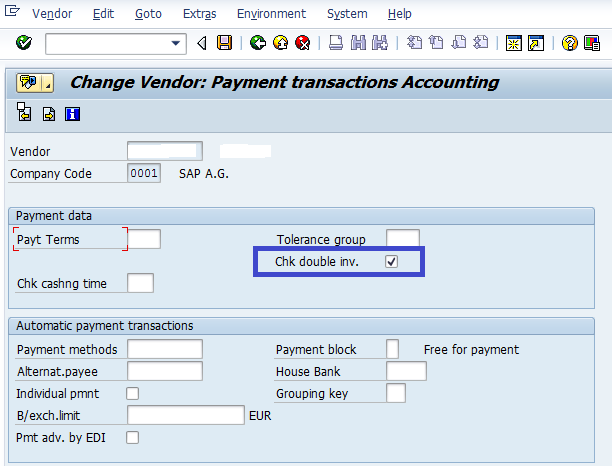
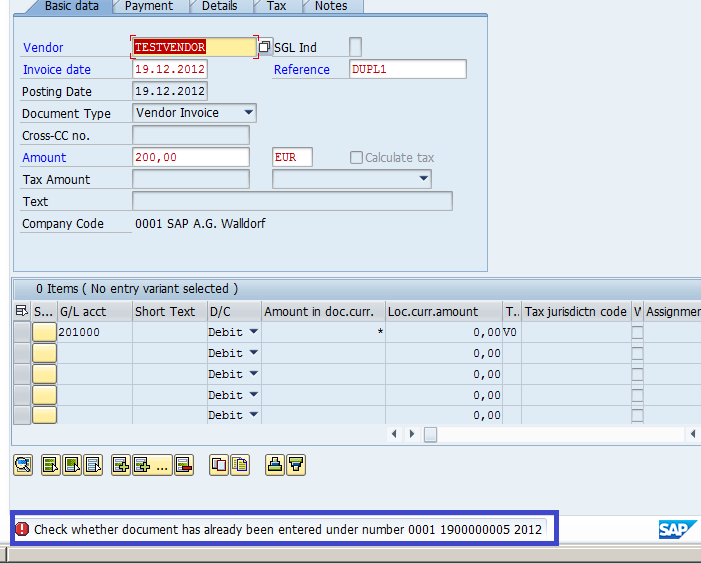
Ajit’s Part 2 demonstrates this perfectly: with the flag switched off, an identical invoice posts straight through; switch it on, and the same invoice is blocked. Across years of vendor maintenance, migrations, and mass loads, it’s common to find a meaningful chunk of the vendor file with this flag turned off, and most organizations have never checked how many of theirs are.
Myth 5: “A flagged duplicate can’t be posted”
Two settings decide whether a flagged duplicate is actually stopped:
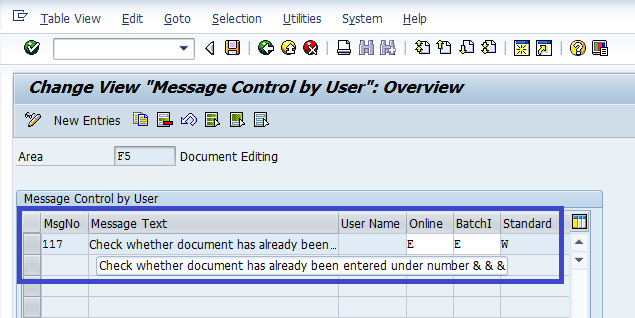
- Warning vs. error. Whether the duplicate message (message class
M8: “Check whether document has already been entered…”) is a hard error or just a warning is configurable. As a warning, the processor can click right past it, and under volume pressure, they do. (More on why that matters in our post on the hard stop.) - The reference number has to be there and consistent. The check leans on the reference (invoice) number. If AP doesn’t populate it, or enters it slightly differently, such as a trailing “A” or a “-1”, the match never happens.
Where to look in your SAP system
You don’t have to guess how your controls are set. Here’s exactly where to check:
- Config: which fields are checked. Transaction OMRDC (Set Check for Duplicate Invoices): confirm, per company code, whether Company Code, Reference Document Number, and Invoice Date are active.
- Vendor master: the double-invoice flag. In BP (or classic FK02/XK02), open the supplier’s company-code data → Payment Transactions and check the “Check Flag for Double Invoices and Credit Memos” indicator (
LFB1-REPRF). Run a report across the whole vendor file to see how many have it off, and make the field mandatory in your vendor screen layout so new vendors always get it. - Message control: warning or error. Transaction OBA5, message area M8: set the duplicate message (e.g., 108) to Error (E) to turn the soft stop into a hard stop.
- Reference number: make it mandatory. In OBA7, set Reference Document Number (
XBLNR) as required on your vendor-invoice document types, so the check always has something to work with.
The bottom line
SAP’s duplicate check is a floor, not a guarantee. It runs within a company code, it keys on currency and invoice date, it’s enabled vendor by vendor, and it can be set to warn rather than block. None of that means SAP is broken. It means the control does exactly what it’s configured to do, and most organizations have never looked closely at how theirs is set. That’s why “impossible” duplicates aren’t impossible at all.
Full credit to Ajit Kumar for the original SAP Community articles that document this configuration in detail: Duplicate Invoice Check Part 1 and Part 2. Worth a read for the full walkthrough.
Want to know what’s getting through in your SAP environment? Start a no-cost Proof of Value and we’ll show you. We only get paid a percentage of what we recover.
Karl has spent 25+ years in AP auditing and analytics, helping finance teams recover lost value and understand their payables. He writes about what he’s actually seen in the field. Read his story →